
I want to backup my blog!

I want to make backup to my blog (), I made some research and found some alternatives.
blogspot have a way to backup all your blogs. Change the template to show ALL your posts in one page, then save it and just return to your old template. I did not like this way, I think the reader can guess why!
From LifeHacker web site I got the idea of offline browsing my blog, so I searched for open source offline browser and found WinHTTrack.
After running WinHTTrack, it downloaded more than 68 Mega of content, I know my blog size is far smaller, it is just 30 posts of around 2 Mega, after some investigation, I found my blog entries are accessible through many ways; as example individually, through my navigation bar, through “Older Posts” link, and through the “Blog Archive” section
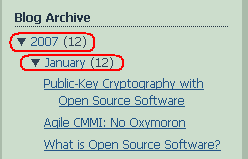 3) When I scanned my “Blog Archive”, I found that I can simply view all year or all month blog entries in one page, so simply I viewed 2005, 2006, and 2007 blog entries and just saved it to my disk as a complete page using FireFox. I really like simple tricks that do the task, my backup is simply done.
Another nice alternative is through reading my atom, so I used Thunderbird to read my atom (yes, Thunderbird has excellent RSS and Atom reader). The atom link is found at the end of blog home page, find “Subscribe to: Posts (Atom)”
In blogger.com, there is an option to receive email with each post, this will enable you to have a copy of your post to your email.
From ahm507.blogspot.com