
Syncthing: Syncing Between Android, Windows, iOS
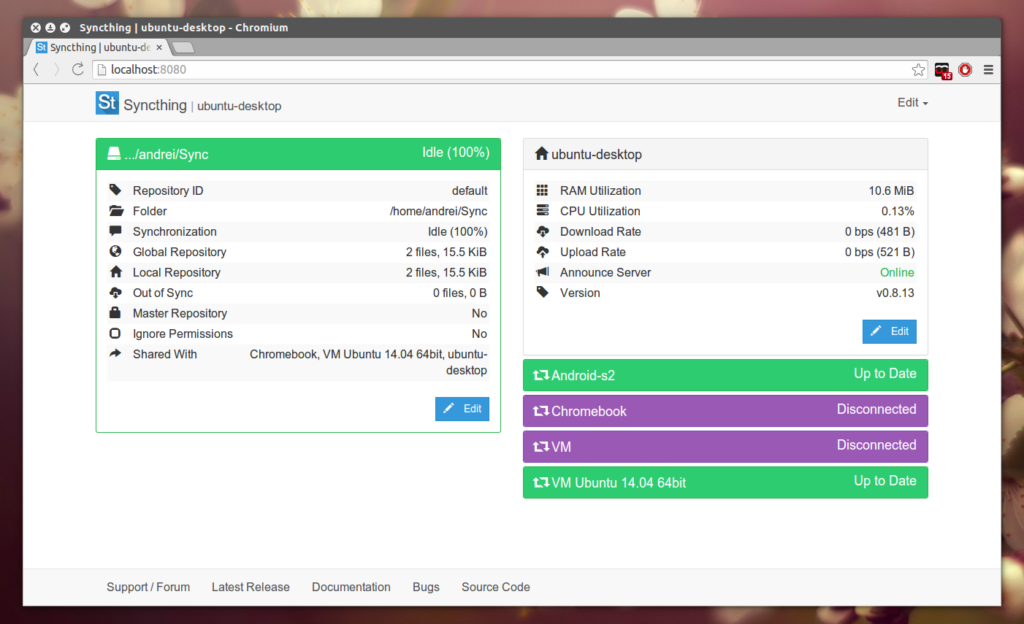
For years, I struggled with clunky cloud services and complex sync tools until I discovered Syncthing—a blazing-fast, open-source file synchronization solution that works directly between devices with no central server required. After using it to sync files between my Android phone and Windows PC, I’m convinced this is the future of personal data synchronization.
What Makes Syncthing Revolutionary?
Syncthing replaces proprietary cloud services with a decentralized, peer-to-peer approach:
- Zero Cloud Dependency: Your files sync directly between devices, eliminating third-party storage and privacy risks .
- Military-Grade Security: All transfers use TLS encryption with perfect forward secrecy .
- Complete Control: Devices authenticate via cryptographic certificates—only your explicitly approved devices can connect .
“Syncthing is everything I used to love about computers… It’s amazing how great computer products can be when they don’t need to deal with corporate bullshit.”
My Android-Windows Sync Setup
1. Windows Installation (Minutes):
- Download the
.exefrom syncthing.net . - The intuitive interface (shown below) lets you manage folders and devices effortlessly.
(Embed: Syncserver Windows app interface showing folder sync status)
2. Android Setup (Critical Tip):
- Use Syncthing-Fork (Google Play Link) instead of the deprecated official app .
- Key advantages:
- Camera Roll Sync: Auto-syncs
DCIM/CameraandPictures/Screenshots. - Battery Optimization: “Sync every hour” mode reduces drain .
- SD Card Support: Writes to external storage on Android 11+ .
(Embed: Syncthing-Fork mobile app showing folder progress)
3. iOS Möbius Sync (Third-Party Client)
- What it does: A paid app ($5) that acts as a Syncthing client for iOS (App Store Link).
- There is a trail version with 20 Mega limit.
- Access files from the Files app on iOS.
3. Pairing Devices:
- Scan your PC’s QR code (from Syncthing’s web UI) using the Android app .
- Share specific folders (e.g.,
Screenshots,Documents)—no need to move files to special directories like~/Dropbox.
Real-World Performance Highlights
- Speed: Files sync in seconds over Wi-Fi. Screenshots taken on my phone appear on my PC before I switch apps .
- Reliability: Despite initial worries about partial syncs (mentioned in some reviews ), I’ve had zero corrupted files.
- Storage Flexibility: Sync any folder.
Advanced Tips I Learned
- Exclude Junk Files: Use
.stignoreto block temporary files (e.g.,*.tmp). Check settings page/screen.
Syncthing vs. Cloud Services
| Feature | Syncthing | Dropbox/iCloud |
|---|---|---|
| Data Storage | Your devices only | Third-party servers |
| Cost | Free | Subscription fees |
| Setup Complexity | Moderate (learning curve) | Simple |
| Custom Folders | Any location | Restricted to app folder |
| Android SD Card Access | Yes | Limited |
*Table based on my experience and community feedback *
Limitations to Consider
- Initial Setup Complexity: Pairing devices via device IDs feels technical (typing long IDs is tedious—use QR!) .
- Not a Backup Tool: Deleting a file on one device deletes it everywhere. Enable file versioning for safety .
Why I’ll Never Go Back to Cloud Sync
Syncthing isn’t just a tool—it’s a philosophy shift:
- No corporate lock-in, no upsells, no hidden limits .
- Works offline—syncs resume seamlessly when devices reconnect.
- Community-driven enhancements like the Android fork’s “Camera Roll” feature keep improving usability .
Get Started Today:
- Windows: syncthing.net/download
- Android: Syncthing-Fork on Google Play
- iOS: Möbius Sync:
- Docs: Syncthing Documentation